Subtitle Co
Overview
AI-powered, customizable captioning tool built for Canva's creator community
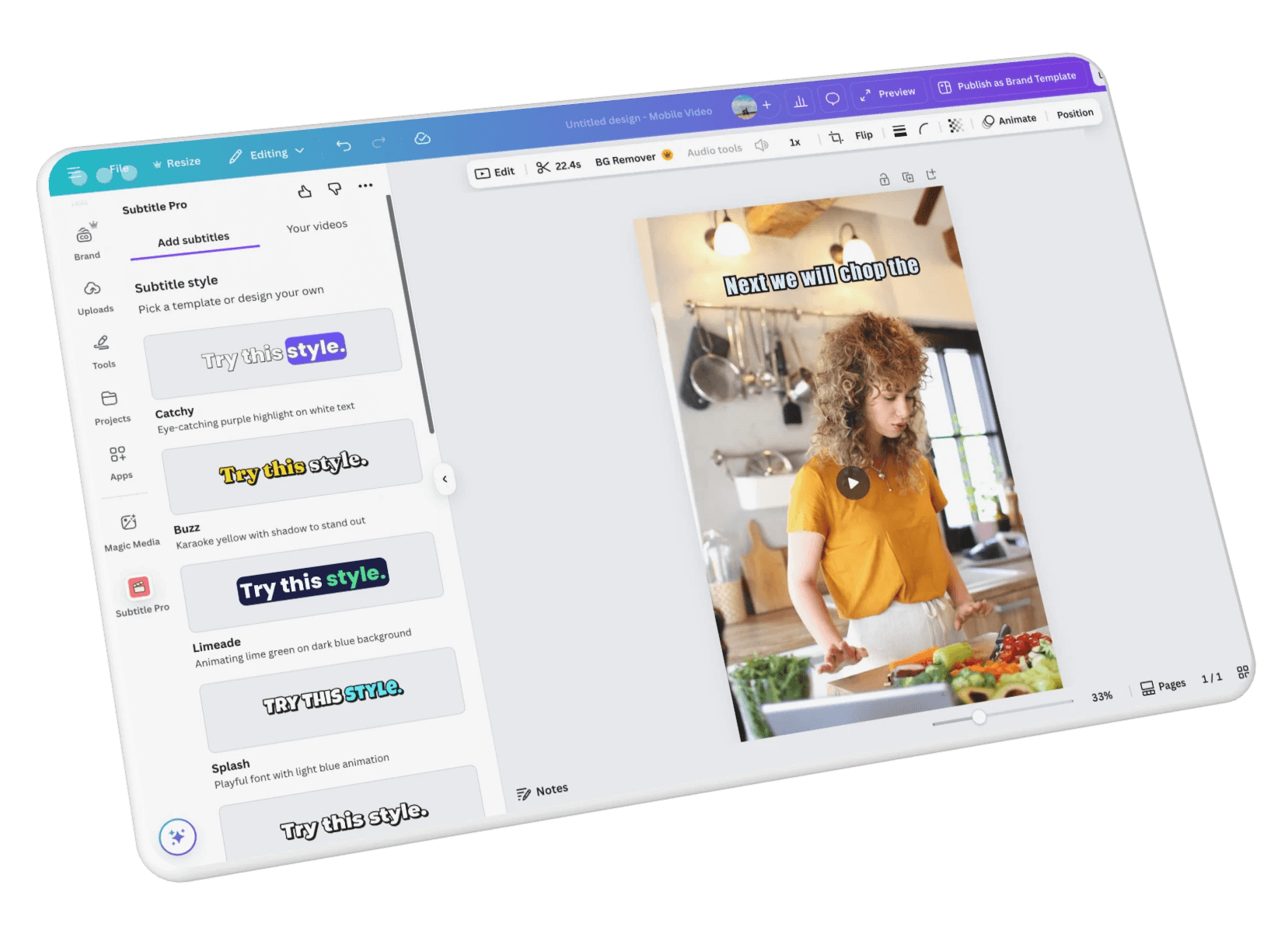
Subtitle Co is an AI-powered captioning tool built on the Canva Marketplace, designed to help content creators quickly generate and customize subtitles for video content. I partnered directly with the founder to design the end-to-end experience, from early exploration to post-launch iteration.
The goal was to create a fast, intuitive captioning experience while operating within Canva’s strict design system and platform constraints. The project required balancing usability with non-negotiable UI limitations, while ensuring the product handled real-world edge cases like videos without audio.
MY ROLE
UX/UI Designer
PLATFORM
Canva Web Application
TIMELINE
Nov 2023 - Dec 2024
Impact
Research
Existing solutions were too complex, lacked customization, or forced creators to leave Canva
I began by analyzing existing captioning tools in the Canva Marketplace to understand common workflows, strengths, and gaps. Most tools prioritized feature depth over usability, resulting in complex, multi-step flows that slowed creators down. The primary users — social media creators, marketers, and small business owners — prioritized speed and simplicity, but their needs varied. Some relied on AI-generated captions while others needed full manual control.
This research revealed two core problems:
- users experienced friction in generating subtitles due to unnecessary steps, and the system had no recovery path for videos without audio.
- Canva's strict platform constraints added an additional layer of complexity, limiting flexibility in interaction design.
Goals
A seamless subtitling experience that never requires leaving Canva
Design a fast, intuitive, and highly customizable subtitling tool that filled a clear gap in the Canva Marketplace — giving content creators a seamless way to generate and customize subtitles without ever leaving Canva.
Design Strategy
Mapping the user journey to reduce friction and handle failure early
I mapped the core user journey and identified opportunities to reduce steps and simplify decision-making at every stage. Rather than designing for ideal conditions, I explored failure scenarios early — particularly around videos without audio — to ensure the experience stayed functional when automation failed.
When initial design explorations conflicted with Canva's strict platform requirements, I shifted toward simplifying the flow using familiar patterns that aligned with Canva's interface. Instead of forcing complexity into a constrained environment, I prioritized clarity over novelty. Every step was evaluated against one question: does this directly help the user generate captions faster? If not, it was removed or consolidated.
Design decisions
Three areas that defined the experience: customization, flow, and edge cases
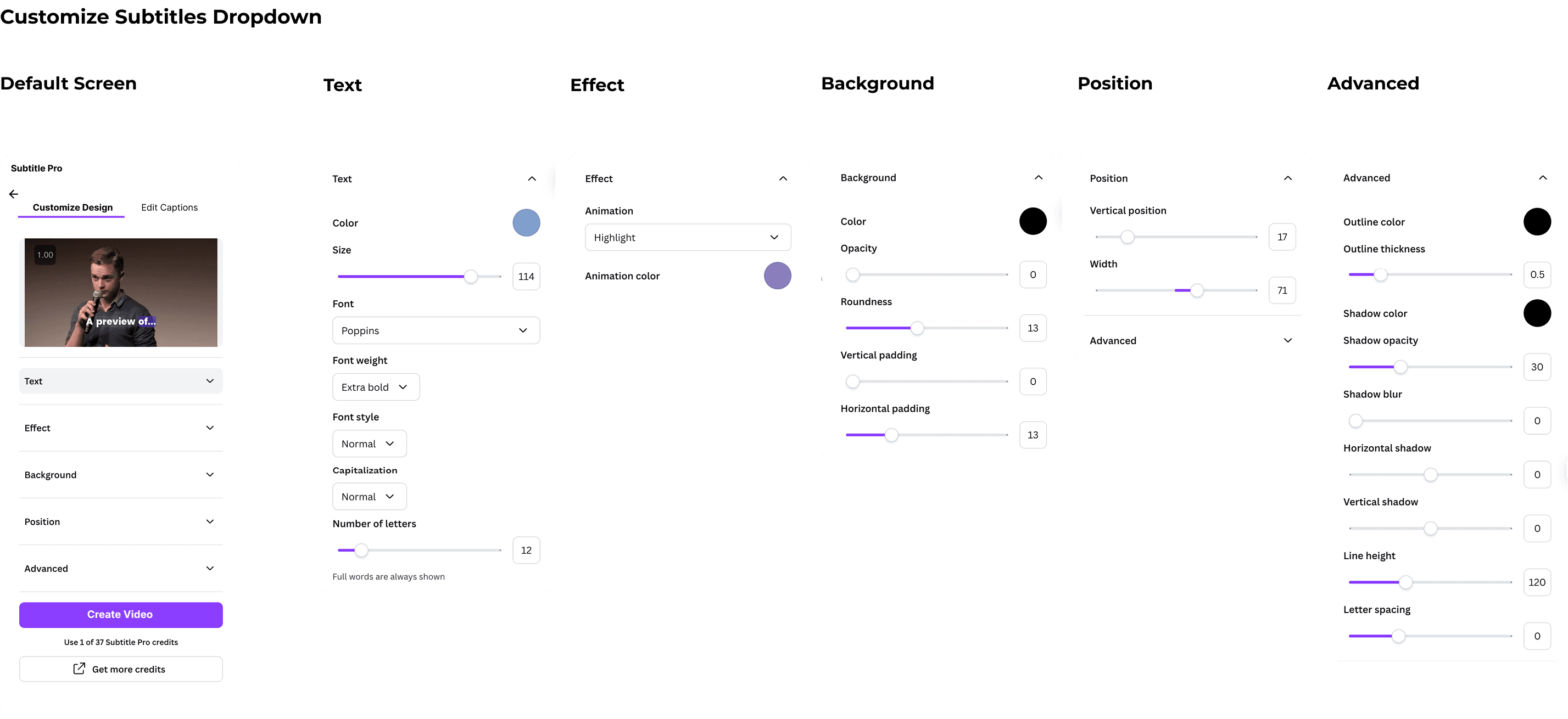
Extensive Customization Within a Minimal Interface
Subtitle Co needed to do a lot: offer deep customization, stay clean and minimal, keep the flow short enough that users wouldn't drop off, and meet Canva's design system requirements. The core tension was between flexibility and simplicity — showing all options upfront would overwhelm users, while hiding too much would limit their control.
Solution
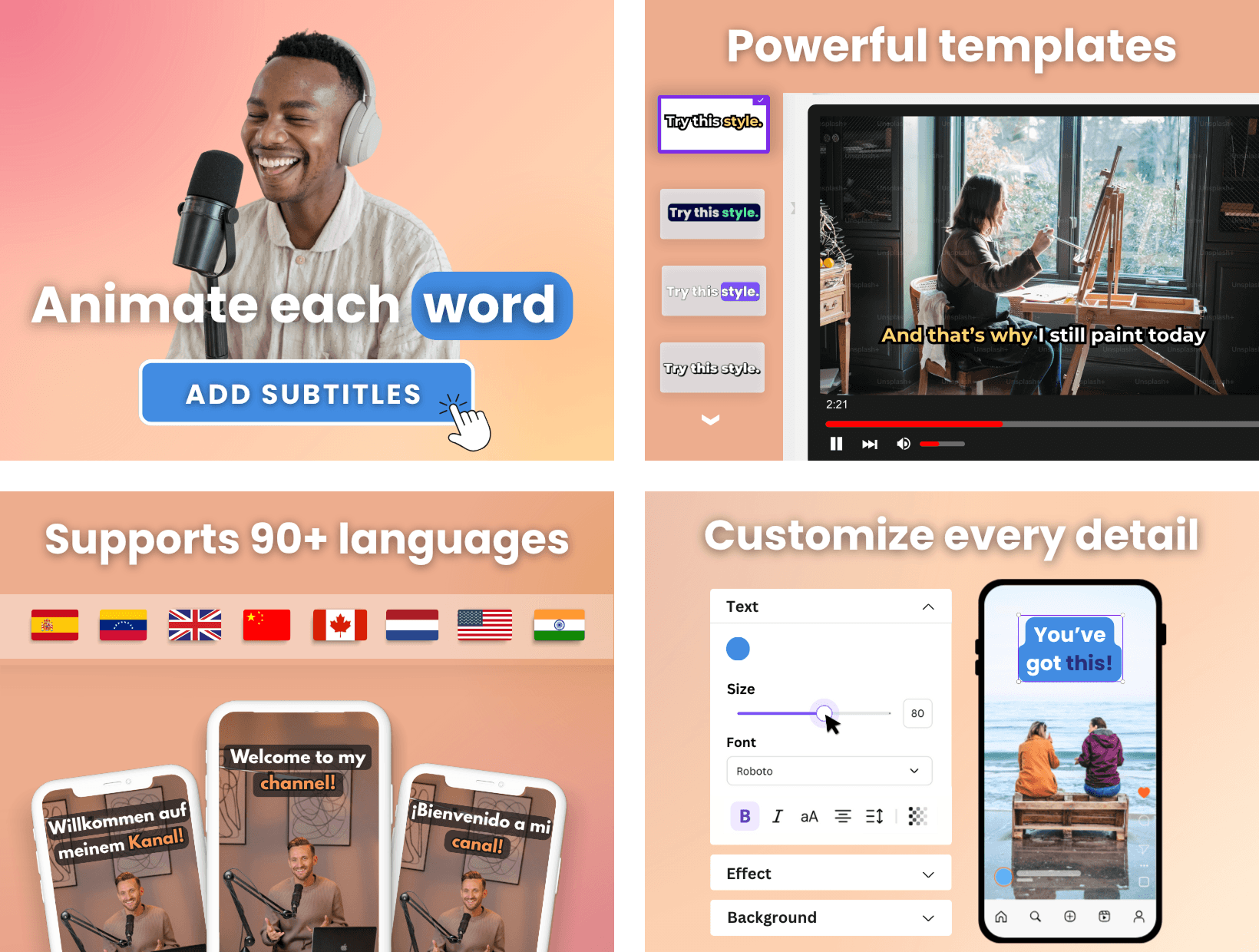
Instead of showing all customization options at once, I organized them into collapsible dropdown menus. Users saw a clean interface by default but could expand sections when they wanted more control. I also added a live preview panel so users could see changes instantly without generating the full video, keeping the experience fast and reducing unnecessary steps.
For users who wanted to skip customization entirely, I designed a "Choose Style" screen with pre-made templates as a quick starting point — giving users two paths: quick and simple, or detailed and custom.
Optimizing a Multi-Step Flow with Technical Constraints
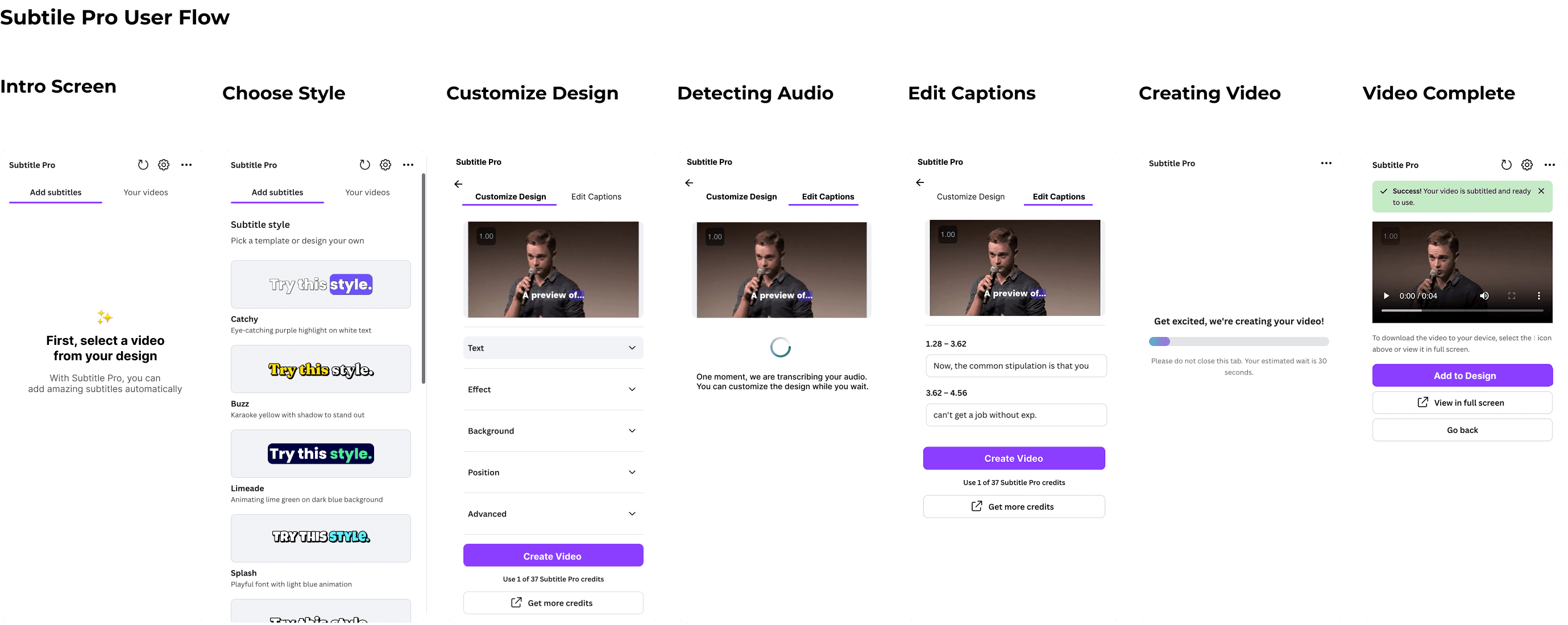
The app required two unavoidable loading stages. The first happened after users chose their style, when the app needed to transcribe the spoken audio. The second happened when users clicked "Create Video," triggering the final render. Two loading screens in a single flow aren't ideal, so my goal was to make them feel as natural as possible.
Solution
I combined "Customize Design" and "Edit Captions" onto one screen with a toggle, hiding the first loading state. This meant users could switch between customizing their style and editing their transcription while the audio processed in the background — turning wait time into active interaction.
When users clicked "Edit Captions" during the loading state, I added the message "You can customize the design while you wait." For the second loading state, I kept the messaging clear and reassuring with an estimated wait time so users knew what to expect.
Supporting Videos Without Spoken Words
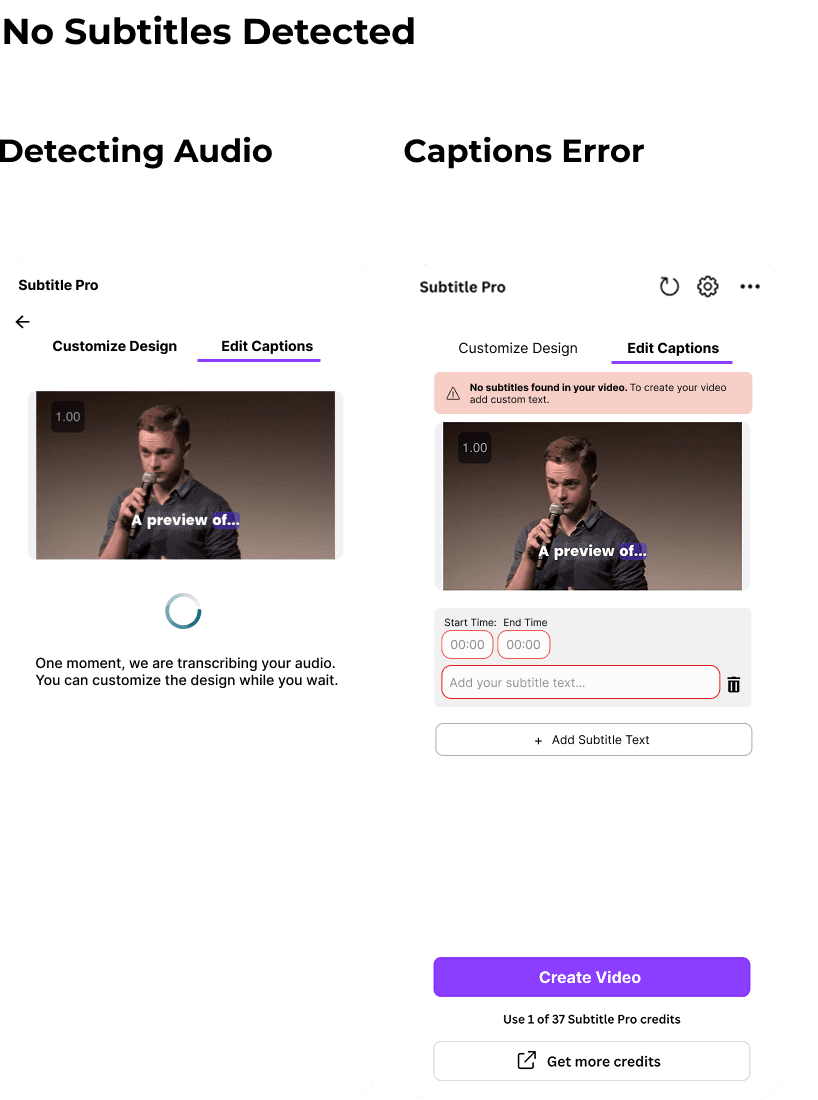
Post-launch, we discovered users were uploading videos without spoken audio, expecting to manually add captions. The system was built around audio detection, so when none was found, the flow broke entirely — leaving users stuck with no way to move forward.
Solution
I introduced a fallback experience that detected the absence of audio and redirected users into a manual captioning flow. Instead of blocking progress, the system now clearly communicates that no audio was detected, provides an immediate option to input custom captions, and introduces a dedicated editing interface for manual control. This transformed a blocking failure into a flexible experience, expanding the product beyond a single automated flow.
Designing Within Canva's Platform Constraints
Working within Canva's ecosystem meant design decisions weren't only evaluated on user needs — they also had to pass Canva's internal review. Every submission is reviewed and often modified by Canva's team, requiring designs to fit predefined UI patterns, interaction models, and component libraries. In many cases, elements had to be reworked to fit Canva's components even when the original design offered a better experience.
Solution
Rather than treating this as a limitation, I approached it as a system design challenge. I leaned into Canva's existing patterns and components, using them as a framework to build within rather than working against. This required simplifying interactions and making deliberate tradeoffs, but the result felt native to Canva while still solving the core user problems.
After launch, the product continued to evolve. The manual captioning flow was the most significant update, addressing one of the biggest gaps we discovered through real user behavior. I've stayed closely connected with the founder, tracking how users engage with the product and continuing to refine the experience as new needs come up.
Final Product
A minimal, customizable tool that feels native to Canva
The final experience brings together deep customization with a clean, minimal interface — users can generate captions quickly with a live preview, or expand into detailed styling when they want more control. The fallback for silent videos ensures the tool works for every type of creator, not just those using AI-generated captions. Designed entirely within Canva's platform constraints, the product feels like a natural extension of Canva itself while solving a gap the marketplace was missing.
View project

outcomes & impact
100K users and a product that's still evolving
Subtitle Co has been live on the Canva Marketplace for over a year and has grown to 100K users — a clear signal that the design is working.
Introducing the manual captioning flow eliminated a critical failure point and expanded the product to support a broader range of creators. Simplifying the multi-step flow reduced friction and improved caption generation speed. And designing within Canva's constraints kept the product feeling native to the platform, enabling smoother adoption at scale.
The founder's vision for Subtitle Co includes making it a pro feature to maximize revenue and eventually transitioning it into a standalone web application for expanded functionality — and I'll continue to be part of that process.
Key Results
100K+ users on the Canva Marketplace
Eliminated the silent video failure case
Expanded to 70+ languages
Reduced steps in the caption generation flow
Key Deliverables
Competitive analysis
User personas & user flows
Wireframes & High-fi prototype
Developer handoff
Marketing assets: logo and promotional visuals